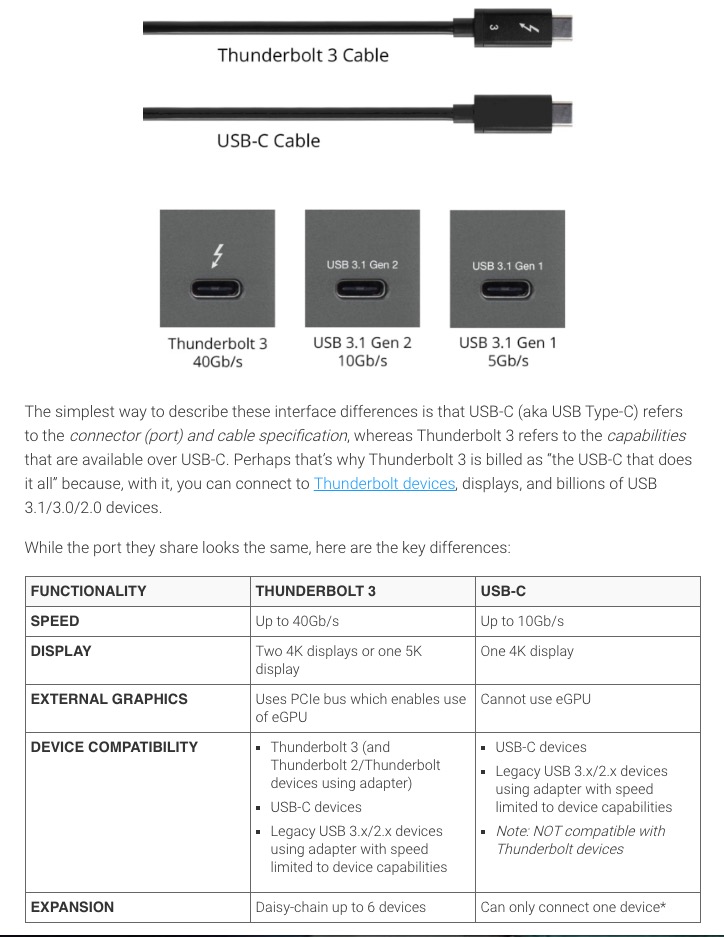
USB-C and Thunderbolt 3 look identical at the port level, but they offer different capabilities. This confuses many Mac users when they buy cables, docks, and external drives.
Same connector, different technology
- USB-C is the connector shape.
- Thunderbolt 3 is a high-speed protocol that uses the USB-C connector.
A USB-C port may support basic USB data only, while a Thunderbolt 3 port supports much more bandwidth and advanced features.
Speed differences
- Typical USB-C (USB 3.x): up to 5Gbps or 10Gbps, depending on version
- Thunderbolt 3: up to 40Gbps
For large file transfers, video editing drives, and pro workflows, Thunderbolt 3 can be significantly faster.
Display and docking support
Thunderbolt 3 usually provides better multi-display and docking performance than standard USB-C. If you connect high-resolution monitors or several peripherals through one dock, Thunderbolt support is important.
Charging and cable confusion
Not all USB-C cables are equal. Some are charge-only, some support USB data, and some support full Thunderbolt 3 speeds. Always check cable specifications before buying.
Quick buying tip
If you only need charging and basic peripherals, a standard USB-C cable may be enough. If you need maximum speed and reliable dock/display performance, choose certified Thunderbolt 3 cables and accessories.